The Borehole Manager T-Text table is used to enter data which were sampled at time intervals (with a specific date/ time) in the boreholes. This might apply to sample ID's, color descriptions, and other alphanumeric information. This data can be displayed in striplogs.
The T-Text values can be typed in by hand, as described below, or imported from another source. You may leave this table blank if you have no time text entries.
See also
I-Data tables for entry of numeric data for interpolation
P-Text for non-numeric data entered with single depth points
- Access the Borehole Manager
- Create a new borehole if necessary, or click on the existing borehole to be edited.
- Click on the T-Text tab for the borehole.

- Define the data columns if necessary: You can have multiple columns in this table, for your different T-Text components; use the Configure button at the top of the table (or the Project Tables | Types Tables | T-Text Types item in the Project Manager) to define these. (More info).
Once you have the data columns defined, you can enter the data. These instructions are for hand-entering the data; please see the links at the end of this topic for other options.
- Depth to Top: Enter the measured depth to the top of the first sampled interval for the hole.
! The depth units must be the same as the Vertical units you defined for the project (and which are displayed on the Location table). For example, if the elevation and TD for the hole are shown there in feet, then the depth listings here must be in feet as well.
! The depth values must be positive.
- Depth to Base: Enter the measured depth to the base of the first sampled interval for the borehole.
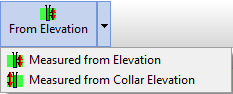
- From Elevation / From Collar Elevation: Use this button at the top of the table to define for this borehole which datum your depths were measured from. The designation will apply to all of the T-Text tracks, for all boreholes.
- Choose Measured from Elevation if the depths were measured from the ground elevation (entered as the "Z (Elevation)" field in the Collar Coordinates tab). This is the default setting.
- Choose Measured from Collar Elevation if the depths were measured from the collar elevation (entered as the "Collar Elevation" field in the Collar Coordinates tab).
-
- Sample Date: Click in (or <Tab> to) the first column to the right of the depths and type in the sample date for that downhole interval, for that component. If you have no data for an interval, you can leave the cell blank. Blank cells will simply be skipped during processing.
- Columns: Click in (or <Tab> to) the next column to the right of the first, and type in the data reading for that component, for that date and interval. Repeat for as many columns as you have entries for, for that depth interval.
- Move on to the second row, clicking in its Depth to Top column, and type in the measured depth to the top of the second sampled interval for the borehole. Continue in this manner, specifying depth intervals, sample date, and measured values, for the entirety of your data. Example:
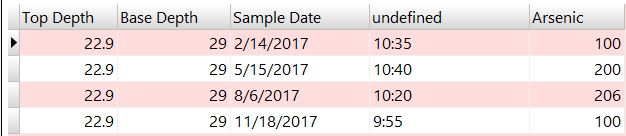
There is no limit to the number of downhole intervals that you may list for each drill hole.
 Back to Data Introduction

RockWare home page