
In a perfect world, you'll have stratigraphic layers which are consistent between boreholes, with top and base depths, with any missing formations listed in proper sequence with zero thickness, and with a Stratigraphy Types table that is sequenced properly from the ground downward. These are the assumptions we made in earlier versions of RockWorks.
If, however, your reality is different, and you have incomplete data - missing units, missing top or base depths, unordered Stratigraphy or HydroStrat Types - then the Stratigraphic Rules should help you create meaningful models and diagrams.
The Stratigraphic Rules are displayed in a tab at the top of the window for those programs which process stratigraphy/hydrostratigraphy data (all menus with striplogs or stratigraphy/hydrostratigraphy tools). They have been added to the program to provide some automated logic for labeling and correlating boreholes with missing stratigraphic information.
! Note that the information in the database is not modified - RockWorks does not actually change the data in the borehole records. Instead it makes these inferences in the background as it is processing your models and/or diagrams.
! Note also that if you have already inserted missing units into the database, applying these rules also may produce unexpected results - you should turn them off.
You will first select if you want to work with the Stratigraphy table or the HydroStratigraphy table. Throughout this menu they are synonymous for the steps, but will use one or the other types tables in the background.
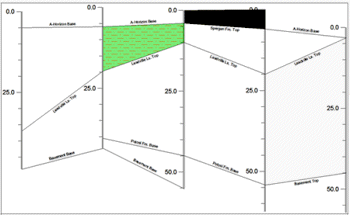
Here's an example of a stratigraphic cross section with straight-line correlations and a lot of missing data, with none of the inferences below turned on. Use this to compare the effect of the options described below.
Infer Partial Units
Infer Missing Contacts
Insert Missing Units
Create Pinchouts with Linear Correlations
 If checked, the program will try to determine a missing top or base depth for a formation based on overlying or underlying strata which are defined.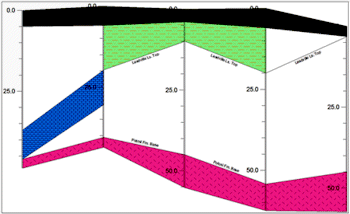
If unchecked, the program will plot the data as-is in logs and sections.
See: Rules details
See: Graphic examples
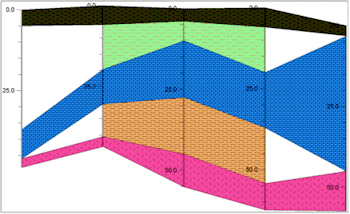
- Infer Missing Contacts: This is a sub-option of Infer Partial Units.
! This setting DOES require that the Stratigraphy Types table be ordered (with formations properly sequenced from the ground downward).
See: Rules details
See: Graphic examples
If checked: If a unit is completely absent from a given borehole, the program will attempt to insert it as a "zero-thickness" interval based on the relative order defined within the Stratigraphy Types table.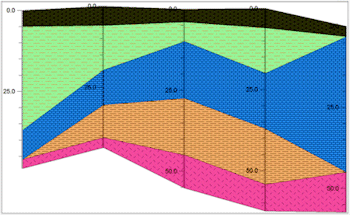
See: Rules details
See: Graphic examples
If checked: If a correlation cannot be made between a borehole interval and an adjacent borehole, the program will compute the midpoint between the two boreholes and construct a triangle that extends halfway from the defined interval and the borehole where the unit is not listed.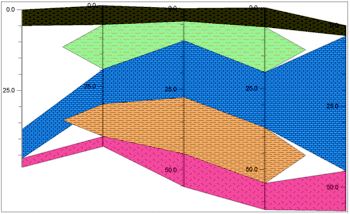
See: Graphic examples
 Back to Rules and Filters
