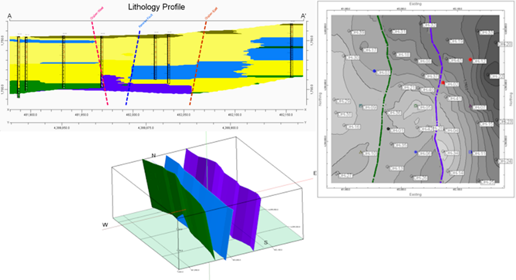
The Faulting tab is now available in the top row of applicable programs and it includes settings related to how faults are used during gridding and solid modeling and displayed in 2D Maps, Profiles, Sections and 3D Diagrams.
NOTE: Only the options that apply to your current program will be shown.
- Use Faults When Interpolating Grids – Click here to enable faulting during the creation of grids and to establish setting. When checked on, faults will be used as a barrier to interpolation during grid creation.
- Use Faults When Interpolating Solids – Click here to enable faulting during the creation of solids and to establish setting. When checked on, faults will be used as a barrier to interpolation during solid model creation.
- Display Faults within 2D Map – Click here to enable the display of faults in 2D Maps and to establish settings.
- Display Faults within a 3D Diagram – Click here to enable the display of faults in 3D Diagrams and to establish settings.
- Display Faults within Panels – Click here to enable the display of faults in Profiles, Sections and Projected Sections and to establish settings.
- Use Faults When Contouring – When this is enabled, the program will take into account faults when drawing both 2D and 3D contours.
-
- If the option is enabled in conjunction with Contour Smoothing, the contour smoothing will not smooth across the fault polyline.
- The user can specify a Fault Gap, where contour polylines within a user-defined distance of the fault will not be plotted.
-
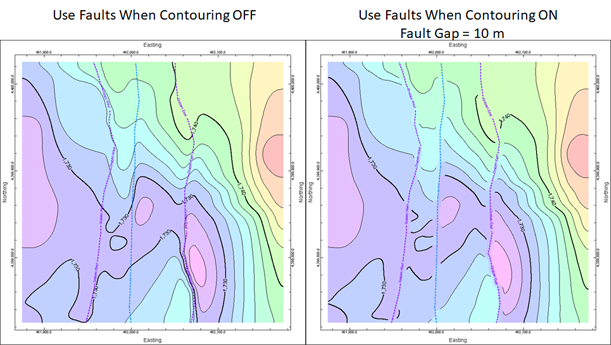
- The program will use the fault polyline as a breakline when drawing contour lines and viewing color fill.

RockWare home page