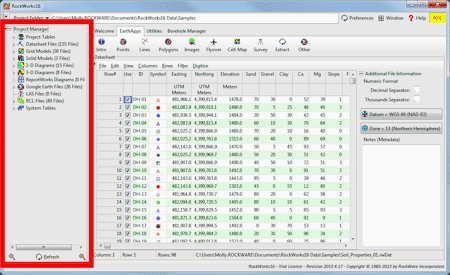
RockWorks utilizes a variety of different reference tables and libraries to perform many of its routine tasks, from plotting symbols on maps and patterns on cross sections, to looking up lithology types and polygon vertices.
You can access the tables and libraries using the Project Manager pane which lies along the left side of the main RockWorks window.
The tables will be listed under two main headings in the Project Manager. To view the individual tables, just expand the heading and sub-heading, and double-click on any of the listed tables to view the table's contents and make any changes. You can click on the links below to access more information about the specific tables.
Project Tables: Stored in the project database (MDB). Locate these at the top of the Project Manager pane, along the left edge of the RockWorks window.
| These define material types for the project (lithology, stratigraphy, etc.) and column headings for certain data tables. Only one table of each type is defined. | |
 Lithology Types Lithology Types |
Lists lithologic "keywords" and the patterns, colors, and other values to be associated with them, for lithologic logs and models (blocks, profiles, sections, fence diagrams, etc.). More ... |
 Stratigraphy Types Stratigraphy Types |
Lists stratigraphic formation names and the patterns, colors, formation order, and other values to be associated with them, for strip logs, surface maps, fence diagrams, models, etc. More ... |
 Aquifer Types Aquifer Types |
Lists aquifer names and the patterns and colors to be used to represent them in diagrams. More ... |
 Bitmap Types Bitmap Types |
Lists borehole image categories. More... |
 I-Data Types I-Data Types |
Defines the column titles for the I-Data table. More... |
| I-Text Types |
Defines the column titles for the I-Text table. More... |
| T-Data Types |
Defines the column titles for the T-Data table. More... |
 P-Data Types P-Data Types |
Defines the column titles for the P-Data table. More... |
| P-Text Types |
Defines the column titles for the P-Text table. More... |
 Well Construction Types Well Construction Types |
Lists materials used in well construction columns in strip logs. They define material names, and the patterns and colors to be used to represent them in log diagrams. More... |
| Define custom settings for maps and models. Multiple versions of these tables are allowed. | |
 Color Fill Table Color Fill Table |
Defines numeric value ranges and the colors to be used to represent them in 2D and 3D color-filled contour maps and 3D solid model diagrams for which you've requested "Custom" color intervals. More ... |
 Contour Table Contour Table |
Defines a listing of Z-values and their corresponding line styles and (optionally) contour labels, to be used by the program when building 2D line contour maps for which you have requested "Custom" intervals. More ... |
 Point Map Range Table Point Map Range Table |
Defines the size and color of symbols in a 2D point map, based on a measured value at that sample location, to create proportional symbol maps (also called "bubble maps"). More ... |
 3D Point Map Range Table 3D Point Map Range Table |
Defines the size and color of the spheres or cubes, based on a measured value at that sample location, to be used in a 3D point map for which you've requested "table-based" symbols. More ... |
 Fault Table Fault Table |
Lists a series of X,Y coordinates pairs to be used to apply faulting to gridded surfaces. More ... |
 Polygon Table Polygon Table |
Lists a series of X (Easting) and Y (Northing) coordinates that identify the boundary vertices of a polygonal area, used to filter grid models and solid models. More .. |
 Polygon List Table Polygon List Table |
Contains a list of Polygon Table names for advanced polygon filtering. |
 3D IDW Sector Table 3D IDW Sector Table |
Defines the 3D search sectors for the Table-Based Inverse-Distance solid modeling algorithm. More ... |
 2D IDW Sector Table 2D IDW Sector Table |
Defines the 2D search sectors for the Table-Based Inverse-Distance gridding algorithm. More ... |
| Define section, profile, and fence locations, and bargraph scaling for logs. Multiple versions of these tables are allowed. | |
 XY Coordinates Table XY Coordinates Table |
Lists a series of X,Y coordinate locations to be used to define the panel endpoints in a RockWorks cross section diagram, if the interactive section-picking map is not to be used. More ... |
 XY Pair Table XY Pair Table |
Lists a series of X,Y coordinate pairs to be used to define the panel endpoints in a RockWorks fence diagram, if the interactive fence-picking map is not to be used. More ... |
 Profile Table Profile Table |
Lists two X,Y coordinate locations to be used to define the panel endpoints in a RockWorks projected profile diagram, if the interactive profile-picking map is not to be used. More ... |
 Bargraph Scale Table Bargraph Scale Table |
Defines the bargraph size for 2D and 3D striplogs, based on measured values. More ... |
| Index Tables |
These are used to create customized legends for 2D diagrams. Multiple versions of these tables are allowed. |
 Color Index Table Color Index Table |
Used to generate a custom color legend inside a map/diagram legend box in RockPlot2D. More ... |
 Line Style Index Table Line Style Index Table |
Used to create a customized legend showing specific line styles and captions inside a map/diagram legend box in RockPlot2D. More ... |
 Pattern Index Table Pattern Index Table |
Used to generate a customized legend showing specific pattern designs and captions inside a map/diagram legend box in RockPlot2D. More ... |
 Symbol Index Table Symbol Index Table |
Used to create a customized legend showing specific symbol designs and captions inside a map/diagram legend box in RockPlot2D. More ... |
 Synonym Table Synonym Table |
A substitution table used by the Utilities | Edit | Columns | Translate utility. More... |
System Tables: These are tables that aren't project-specific and are stored in the RockWorks System folder or System database (MDB). You can locate these at the bottom of the Project Manager pane, along the left edge of the RockWorks window.
 Patterns Patterns |
The Pattern Table contains the RockWare pattern library, containing the graphic pattern designs used in logs, cross sections, and geology maps (Borehole Manager), lease maps (Utilities). More ... |
 Symbols Symbols |
The Symbol Table contains the RockWare symbol library, containing graphic symbol designs used in maps and diagrams. The symbols can be displayed in the Utilities datasheet and in the Borehole Manager Location and Symbols tabs. More ... |
 Color Names Color Names |
This table lists color names, in "regular" language (such as "dark brown" or "10YR 3/6" Munsell codes) and their color equivalents. These can be used to associate rock descriptions with Windows colors in the Colors datasheets. More ... |
 DLG Attributes DLG Attributes |
Used by RockPlot2D to know how to plot different Digital Line Graph entities (roads vs. rivers, etc.). More ... |
 Rock Densities Rock Densities |
Used as a reference table for determining the densities of various rock types. More ... |
 Well Status Well Status |
Used by the Tobin, KGS, and IHS import utilities, and the symbol update tool, to make a association between well status and well symbol. More... |
See also: Managing Project Look-up Tables
