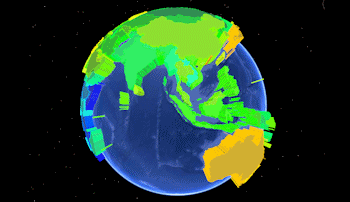
Predefined polygon data can be read by the Utilities | EarthApps | Polygons | Predefined Polygons menu options. They are used to list the names of countries or U.S. States, plus any kind of measured data for those locations, in order to display polygons in Google Earth, extruded based on the measured value. Here's an example of what the Google Earth output might look like:
Examples

Column Summary
- Country or State Name: The country or state names that you list in the Datasheet Editor are cross-referenced by RockWorks against a set of polygon outline definitions, installed in the program's "Tables" folder (C:\ProgramData\RockWare\RockWorks17\Tables\). You need to be sure to use the same spelling as is used in these ".xy" files.
- Country definition files are named "Country_countryname.xy" where countryname is the name you need to list in the datasheet. Here are some examples:
- Country_France.xy - matches with an entry of "France" in the datasheet.
- Country_French Polynesia.xy - matches with an entry of "French Polynesia" in the datasheet. Note the space.
- State definition files are named US_State_statename.XY where statename is the name you need to list in the datasheet. Examples:
- US_State_Colorado.xy - matches with an entry of "Colorado" in the datasheet.
- US_State_New Hampshire.xy - matches with an entry of "New Hampshire" in the datasheet. Note the space.
- Data: The remaining columns in the data file can list any measurements for the listed country or state. These values can be used to scale the height (and color) of the polygons. Examples: Population, housing starts, employment, beer consumption, you name it.
Sample files: Predefined_Polygons_Simple_01.rwDat, Predefined_Polygons_Advanced_01.rwDat
You can open these from the EarthApps Samples folder, choose File | Save As, save copies into your project folder, and replace the sample data with yours.
See also: Google Earth State/Country (Predefined) Polygon Maps - Simple and Advanced

RockWare home page