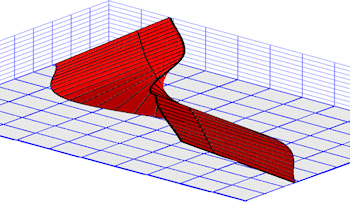
3D fault "ribbons" are offered as a 3D diagram layer. They apply to solid models to which you have applied 3D faulting. The fault location information is stored in the solid model file (.RwMod).
3D faulting requires RockWorks Advanced level.
- Faults: Insert a check in this Block Diagram Option to display 3D fault ribbons in the 3D diagram.
- Group Name: Type in the name for the item in RockPlot3D.
- Fill Mesh Triangles: Check this box if the triangles comprising the ribbon are to be filled with a solid color (as shown in the above example). Click Fill Color to choose the color and Thickness to assign panel thickness (in project units).
- Plot Triangle Perimeters: Check this box if the boundaries of each triangle comprising the ribbon are to be displayed. Use the Line Color box to choose the color and the Line Thickness setting to select the thickness in pixels.

RockWare home page