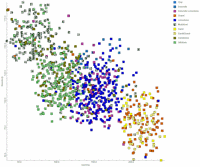
RockWorks | Borehole Manager | P-Data |
Analyze | P-Data -> Lithology | Apply Predictive Model
Use this program to read the contents of an existing predictive lithology model (created under P-Data | Analyze | P-Data -> Lithology | Create Predictive Model) and apply those predictions to wells without lithology entries.
! This tool requires that you have created a predictive lithology model AND that you have determined that the predictive model shows good correlation for the calibration wells.
! We highly recommend backing up your database (File | Backup Database) before running this tool.
Feature Level: RockWorks Standard and higher
Menu Options
Step-by-Step Summary
Menu Options
- P-Data Track #1: Click here to select the name of one of the existing P-Data columns that contains the measurements to be analyzed.
- P-Data Track #2: Click here to select the name of the second P-Data columns to be analyzed.
! These should be the same tracks used when you created the predictive model.
- Predictive Lithology Model (Grid): Click here to browse for the name of the grid mode (.RwGrd file)l, created in the P-Data | Analyze | P-Data -> Lithology | Create Predictive Model, that you wish to apply to your logs with no lithology.
- Sampling Interval: Click here to type in the depth interval in the logs at which you want lithology to be recorded. For example, if you enter "5", then the program will read each borehole's P-Data measurements every 5 feet downhole (or meters), determine the lithology type for that P-Data pair (from the predictive model), and record that lithology material for the 5-foot (meter) interval.
Step-by-Step Summary
- Access the RockWorks Borehole Manager program tab.
- Backup your database using the File | Backup Database option.
- Disable the calibration boreholes (which do contain lithology) by removing checks from the boxes next to their names.
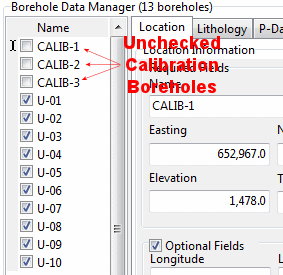
- Enable the boreholes to be assigned lithology data by inserting checks in the boxes next to their names. Be sure that these boreholes also contain data in the two P-Data tracks that are to be analyzed. If any of these holes are missing either or both P-Data tracks, disable them also.
- Select the P-Data | Analyze | P-Data -> Lithology | Apply Predictive Model menu option.
- Establish the desired menu settings, as discussed above.
- Click the Process button to proceed.
The program will read each active borehole's selected P-Data tracks. At each specified depth interval it will determine the closest P-Data measurements and then refer to the predictive model as a "look-up" reference. The lithology type stored for that P-Data pair will be recorded for that depth interval in the borehole's lithology table.
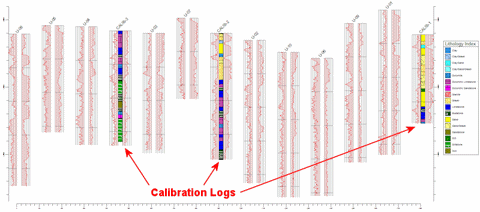
Original data:
Interpolated data:
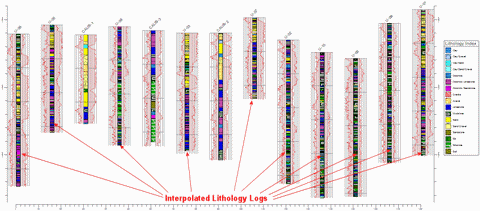
This tool posts data only; no graphics are created. The diagrams shown above were generated using the Striplogs | 2-Dimensional | Multi-Log Section tool.
 Back to P-Data Menu Summary

RockWare home page