RockWorks | Subsite | Edit Subsites
Users can load dimensions from an existing subsite that has already been created in their project.
A quick way to add this command to the Playlist is from the Subsite Dialog. From that dialog there is a "RCL" menu item , which has options to "Add to Playlist" and "Export to a RwCmd file".
- Click on the Subsite dropdown menu in the main RockWorks program window.
- Click on the Edit Subsites option and choose the RCL menu to Add to Playlist or Export the RwCmd file for later use.
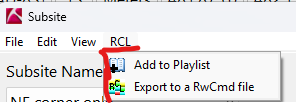
- You will be prompted to rename or save the Playlist Item as is in your list. Click OK to save the current subsite dimension settings to your playlist before closing.
 Back to Playlist Overview

RockWare home page