RockWorks | Borehole Manager | File |
Export | Stratigraphy | Google Earth Logs
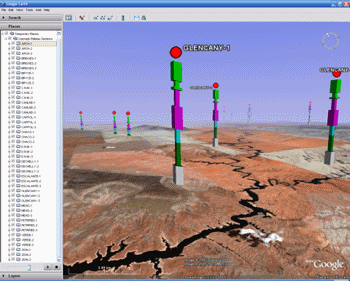
Use this program to export stratigraphy data to Google Earth, plotted as vertical logs above the ground surface. Translation of your project database coordinates to longitude and latitude will occur automatically.
Two versions of this program are available:
Simple: There are no menu settings to establish.
Advanced: A variety of menu options are available.
Menu Options
Step-by-Step Instructions
Menu Options
- Include:
- All Enabled Boreholes: Choose this option to create stratigraphy logs for all enabled boreholes in the database.
- Only the Currently Highlighted Borehole: Choose this option if you want to generate output for the active borehole only.
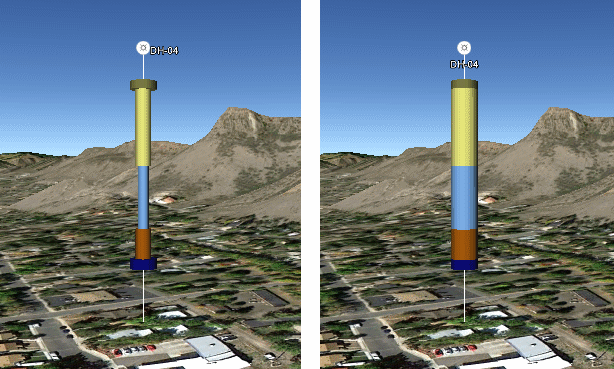
- Column Radius (meters): Use this setting to define how wide the logs will be, expressed in meters. The default setting is "2".
- Fixed (ignore Fill Percent): If unchecked, the stratigraphy intervals will plot based on the width declared in the Fill Percent column in the Stratigraphy Types table, which is a means of conveying erosion characteristics. If checked, then the logs will be of constant width.
- Plot Lines from Boreholes to Ground: Check this box if there should be a line extending from the base of the borehole to the ground surface.
- Color: Click on the color box to choose a color for these lines.
- Thickness: Enter the thickness (pixels) for the lines. A setting of "1" will create thin lines, and "3" will create thick lines.
- Plot Borehole Titles: Insert a check in this box to include borehole names at the top of the logs.
- Label Scale: This controls the size of the labels. Enter "1" for the default setting. If these are too large, enter "0.5" to scale the text smaller.
- Plot Borehole Symbols: Insert a check in this box to include borehole symbols at the top of the logs. The program will use the Raster Symbols defined in the Location table for each hole.
- Symbol Scale: This controls the size of the symbols. Enter "1" for the default setting. If these are too large, enter "0.5" to scale the symbols smaller.
- Title/Symbol Vertical Offset (Meters): Enter the vertical offset for the titles and symbols, above the top of the log, defined in meters. (Default = 10)
- Auto-Shift: Check this box to have Rockworks automatically shift the logs vertically upward, so that they will display above the ground surface. (Google Earth does not display objects below ground.)
- Vertical Offset (Meters): Use this setting to manually shift the logs upward in Google Earth, if the auto-shift is not activated, or to add an additional shift, if auto-shift is active.
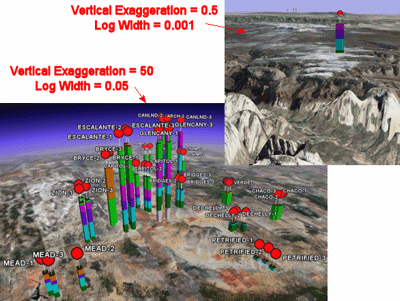
- Vertical Exaggeration: Use this setting to define how tall the logs will be in relation to the ground surface. The default setting is "1" - increase this value to make the logs appear taller, and decrease this value to make them appear shorter. See the images below for examples of the relationship between vertical exaggeration and column width.
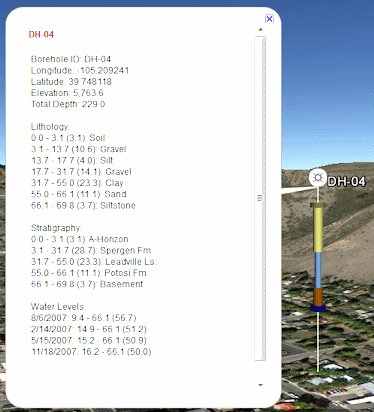
- Linked Description Includes: Expand this heading to select which data, if any, is to be included in the pop-up descriptions in Google Earth.
Step-by-Step Summary
Follow these steps to create a Google Earth view of your stratigraphy logs.
- Access the RockWorks Borehole Manager program tab.
- Be sure there is stratigraphy data listed for one or more boreholes.
- Be sure the boreholes whose data is to be exported are enabled (shown with check-marks in the Borehole Manager list).
- Select the File | Export | Stratigraphy | Google Earth | Advanced menu option.
- Establish the log settings, as described above.
- Click the Process button to proceed.
The program will read the stratigraphy data for the enabled boreholes and create a KML file with the log data. It will create a KMZ (zip) file containing the KML file. The Google Earth KML and KMZ file names will be assigned automatically.
- If RockWorks displays the KMZ name in a popup window for your reference, you can confirm:
- Automatically load file into Google Earth: Be sure this is checked if you want to display the output at this time.
- Show this message every time a KMZ File is Created: If checked, this window will be displayed each time a Google Earth output is created. Uncheck this if you prefer not to see this window in the future.
(Both of these settings are also available via the Preferences menu.)
- Click OK to continue or Cancel to cancel the operation.
The logs will be displayed in Google Earth, if requested.
 Back to Exporting Data
"Google Earth" is a trademark of Google Inc.

RockWare home page