Step-by-Step Summary
- Be sure to first set the display as you would like, particularly the adjustment of the minimum isolevel to be viewed.
- Use these controls to run the morph "movie".
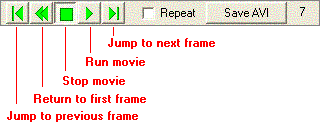
- To keep the movie running in a continuous loop, insert a check in the Repeat check-box.
The number of the current frame will be displayed along the right side of the controls.
 Back to RockPlot3D Morphing Settings

RockWare home page