RockWorks | Borehole Manager | P-Data | Analyze | Logarithm
Use this program to read the values in a P-Data column and compute their logarithms, recording these in a user-selected P-Data column. Any existing data in the output column will be overwritten. Several logarithmic schemes are available.
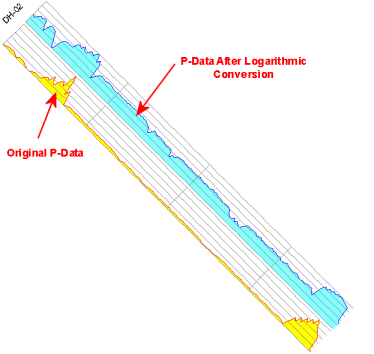
Logarithmic conversions are useful when you want to show the variations within the low values in a log curve despite high values that otherwise "squish" the curve when using the autoscale option. (Note that logarithmic scaling of your original data values is an option when plotting p-data striplogs as well as when creating a solid model of your measurements; this tool would be used to list the logarithmic values in the database itself.)
Feature Level: RockWorks Standard and higher
Menu Options
Step-by-Step Summary
Menu Options
- Input Track: Click here to select the existing P-Data column that contains the measurements to be converted to log scale.
- Output Track: Click here to select the P-Data track where the output logarithm computations are to be recorded.
! Note that this is a P-Data column that must already exist.
- Operation Type: Choose the type of logarithmic computation to be done:
- Natural Logarithm. The natural logarithm, formerly known as the hyperbolic logarithm, is the logarithm to the base e, where e is equal to 2.718281828459... (continuing infinitely). The result will be set to zero if the original value (x) is less than or equal to -1. For more information, visit http://en.wikipedia.org/wiki/Natural_logarithm.
- Natural Logarithm of X+1. The result is more precise for small values of x. The result will be set to zero if the original value (x) is less than or equal to -1.
- 10-Base Logarithm. The result will be set to zero if the original value (x) is less than or equal to zero.
- 2-Base Logarithm. The result will be set to zero if the original value (x) is less than or equal to zero.
- Apply to, All Boreholes vs. Currently Highlighted Borehole: Choose whether the program is to perform the computations for a single borehole (the currently-selected well) or for all of the enabled boreholes, by clicking in the appropriate radio button.
Step-by-Step Summary
- Access the RockWorks Borehole Manager program tab.
- Create, if necessary, a column in the P-Data tab where the logarithmic computations will be stored. If there is any existing data in this column, it will be overwritten. See Defining the P-Data Columns for more information.
- Select the P-Data | Analyze | Logarithm menu option.
- Enter the requested menu settings, described above.
- Click the Process button to proceed with the computations.
The program will read the contents of the input track and perform the requested computations, recording the output in the indicated P-Data column.
You can now display the values as a curve on striplogs, and the lower values will no longer be lost to higher anomalies.
 Back to P-Data Menu Summary

RockWare home page