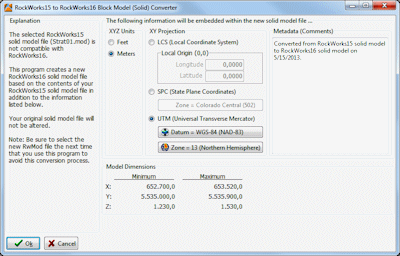
This program window will be displayed when you are working with a RockWorks15-version .MOD file, and RockWorks17 needs to update the model to the newer .RwMod format. Specifically, you need to assign coordinate information.
Note: there is also a separate converter program installed with RockWorks for converting ATD, GRD, MOD, RK6, and R3DXML files from RockWorks15 in a batch. Look for the RW 15 to 17 Conversion Tool shortcut which is installed with RockWorks17.
Menu Options
- XYZ Units: Choose Feet or Meters to define the units for the model. This will apply to the XY (map) locations, as well as the vertical (elevation) axis.
- XY Projection: Use these settings to define the coordinate system that is represented in the .MOD file. The model dimensions are displayed at the bottom of the window, for your reference.
- Local Coordinates: Choose this if the XY coordinates in the .MOD file are undefined, if you don't know what they represent, or if they are X and Y coordinates in a local grid (e.g. not using global system). RockWorks will assume a Cartesian coordinate system whereby X coordinates increase in value to the east, and Y coordinates increase to the north.
- Local Origin: You can geo-reference your local coordinate system by entering the longitude and latitude coordinates in decimal degrees that exist at the local coordinate "origin" of 0,0. If you don't know these global reference coordinates, you can leave the Local Origin set to a Longitude of 0.00000 and a Latitude of 0.00000.
- State Plane Coordinates: Choose this if the XY coordinates in the .MOD file are based on the US State-Plane system.
- State Plane Coordinate Zone: The State Plane systems are zone-specific, so you need to define the zone to which the coordinates apply. Click on the Zone button to see a reference map; choose the zone from the scrolling list to the right of the map.
- UTM Coordinates: Choose this option if the XY coordinates in the .MOD file are based on a Universal Transverse Mercator system.
- Datum: Click on the large button to view the available projections. The two most common projections for the U.S. are:
- Clark 1866 (NAD-27): Used within most USGS maps. NAD-27 coordinates may be as much as 200 meters from WGS-84 (NAD-83) datum of the exact same coordinate.
- WGS-84 (NAD-83): Used by GPS (Global Positioning System) units and more recent USGS maps.
- Zone: Click on this button to display an interactive map where you can click on the UTM Zone for the model.
- Metadata (Comments): This information is stored in the RockWorks17 solid model files (.RwMod). They can contain any reference information you would like to add.
See also

RockWare home page