RockWorks | Utilities | File | Import | ModPath (Particle Flowpaths)
This program is used to import the data from an ModPath ASCII "Pathline File" into the Utilities datasheet.
Menu Options
Step-by-Step Summary
Menu Options
- Input File: Browse for the name of ASCII "Pathline File" created by ModPath.
- Coordinate Offsets: These numbers will be added to the coordinates within the Pathline File. They are used to offset the ModPath coordinates back to your original coordinates (assuming that you modified your initial coordinates to accommodate ModPath's coordinate scheme).
- Decimal Places: Number of decimal places to be used when copying the Pathline data into the RockWorks datasheet, for Horizontal, Vertical, and Time units.
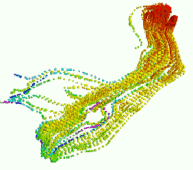
- Maximum Time: This program will create a column titled "Color". The colors will range from hot (red) to cold (purple) based on the cumulative tracking time. In order to establish this color, RockWorks must know the maximum time that should correspond to the coldest color.
- Sphere Size: This program will create a column titled "Size". This column may be used if you plan on plotting the flowline points via the Grafix / 3D Utilities / Spheres program, as shown by the diagram at the top of the page.
Step-by-Step Summary
- Access the RockWorks Utilities program tab.
- Create a new datasheet if necessary by choosing File | New | Blank.
- Choose the File | Import | ModPath (Particle Flowpath) menu option.
- Establish the menu settings as discussed above.
- Click the Process button.
The program will read the input Modpath Pathline file, and it will create a new datasheet that lists path line number; X, Y, and Z coordinates for the measurement; cumulative tracking time, color (automatically assigned, with hot colors = short times and cool colors = long times), and "size" should you wish to display the particle flowpaths as 3D spheres in the Map / Sphereplot program.
The datasheet that is produced by the ModPath import program is depicted within the following diagram:

 Back to Importing Data

RockWare home page