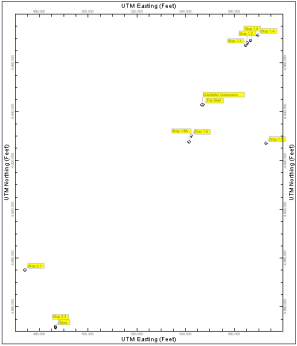
- Longitude/Latitude: Choose how the input coordinates are recorded by clicking in the appropriate radio button.
- Elevations: Choose the units for the input elevation measurements by clicking in the appropriate radio button.
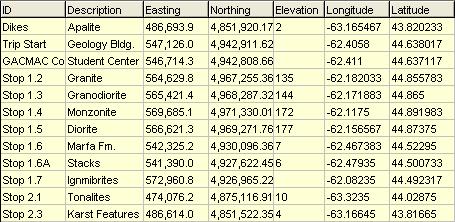
- Waypoints: If you choose this option, the program will create a datasheet that contains the waypoint ID, description, easting (calculated), northing (calculated), elevation (from GPS), longitude (from GPS), and latitude (from GPS)data.
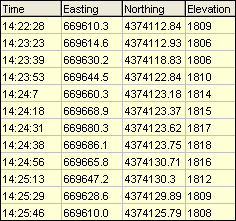
- Tracks: If you choose this option, the program will create a datasheet that contains the GPS time, easting, northing, and elevation, as shown within the following example.
- Projection (Datum): Expand this heading to choose the desired projection. If you don't know which to choose, the WGS-84 (NAD-83) option is one of the more common choices. Earlier versions of RockWorks used NAD-27 exclusively.
- Zone: In order to translate coordinates between longitude/latitude and UTM, you need to define the UTM Zone for the translation.
- Automatic: (Default) RockWorks will read the range of the longitude coordinates being translated and pick the zone that best encompasses them.
- Manual: If you prefer to select the UTM Zone manually, expand this heading to do so. You should choose a zone with a longitude range that encompasses your longitude coordinates. For example, if you were translating coordinates in the Denver, Colorado, USA area, you would choose UTM Zone 13 which extends from -102 to -108 longitude. (Western longitudes are noted as negatives.)
- UTM Units: Specify if the UTM coordinates for the track points or way points should be saved as meters or feet.