RockWorks | Utilities | Grid Editor | Edit | Smooth
The Grid Editor offers a grid-smoothing filter that operates just like the one available in the Utilities | Grid | Filters menu.
Step-by-Step Summary
- Click on the Smoothing Filter Window Size item along the left to select the size of the averaging filter. This determines how many adjacent nodes should be used when computing the average (smoothed) Z-value for each grid node.
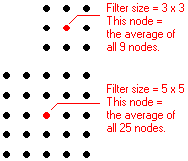
- If you choose "3 x 3", then each node will be assigned the average of itself and the 8 nodes immediately surrounding it, 1 layer deep. If you enter "5 x 5", the node will be assigned the average of itself and the 24 nodes immediately surrounding it, 2 layers deep. When in doubt, choose "3 x 3".
- With the filter size established, click on the Smooth button or choose the Edit | Smooth menu command.
-
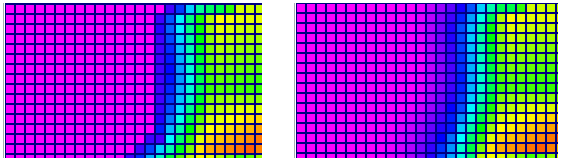
Now, draw along the contours to be smoothed, to average the node values. The color contours will be updated as you draw. The following is an example of an isopach (thickness) grid, showing a fairly abrupt edge in the view on the left, and a smoothed edge on the right.
 Back to main Grid Editor topic

RockWare home page