Menu Options
If your LogPlot files contain one or more "Histogram Columns" or "Interval Data Columns" their names will be listed on the I-Data import tab. Here you can import data to a RockWorks I-Data tab (numeric data), to a RockWorks I-Text tab (alpha-numeric data), and/or to a RockWorks T-Data tab (numeric data with dates). RockWorks allows an unlimited number of I-Data, I-Text, and t-Data columns to be defined.
! The RockWorks I-Data and T-Data tabs will not accept any alphabetic characters. An entry of "nd" (for "no data") in the midst of a numeric listing will not be imported. Entries such as "6-7" will not be imported.
- Click on the Configure Data Import’s I-Data tab.
- Page: Use these drop-down prompts to select the RockWorks table where the LogPlot entity is to be imported. You can choose from Interval-Data (numeric data only), Interval-Text (either numeric or alphabetic data), or Time Data (numeric data with dates).
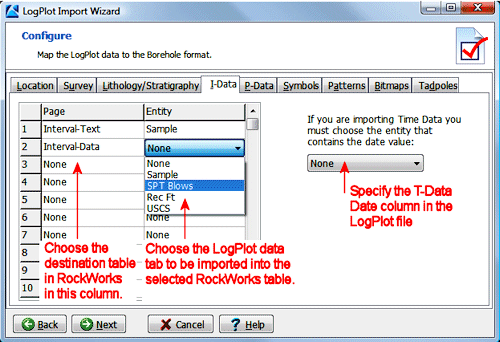
- Entity: Use the drop-down prompts here to select, for each specified destination table, the name of the LogPlot Interval Data tab, or the name of the column within the LogPlot Multi-Interval tab, to be imported.
- Time-Data: Use the prompt to the right to specify the LogPlot column that contains the date fields (required for T-Data). You do not need to import all available LogPlot interval data.
- Click the Next button to proceed to the next step.
 Prev ( set up lithology/stratigraphy ) | Next ( set up P-Data )
Back to main topic

RockWare home page