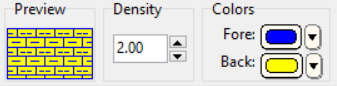
The Select Pattern window lets you adjust the pattern color for the current keyword. You can define both a line color (for the pattern's design) and a background color.
Users can select the Lithology Pattern background color as a Munsell Color. Enter the Munsell Color code(s) directly into the datasheet. If the code doesn't match an existing color the text will appear in red.
The changes you make will be reflected in the current pattern's preview to the left.
 Back to the Select Pattern Window
